Analysts
Pull insights from data files, draft commentary, sanity-check numbers.
Rewamil doesn't just answer questions. It helps you draft, analyse, summarise, review and decide — on your own files, on your own terms.
Built for the people who keep organisations moving — analysts, managers, executives, consultants, auditors, company secretaries, HR. It slots into your existing workflow without forcing a new vocabulary.
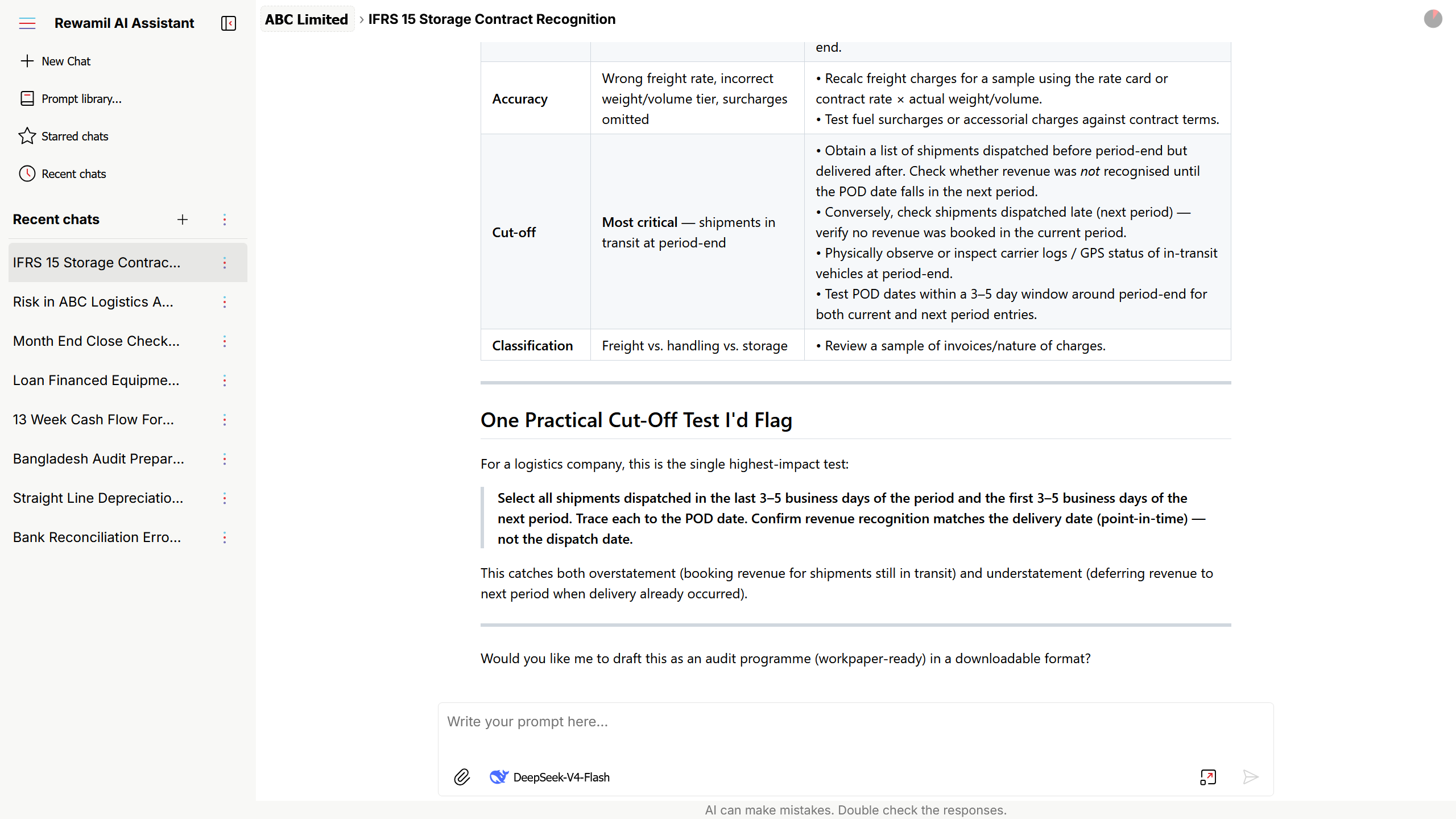
Bring your own files into the conversation, organise work the way you organise your week, and pay only for what you actually use.
One screen, one conversation, zero clutter — built so the AI's reply is the focus.
Switch between providers and models mid-chat. Pick the right tool per message.
Attach documents and the AI reads them as part of your prompt.
Reusable starting points — each with its own model, reasoning and tone settings.
Separate client work, projects and personal notes. Star and archive what you need.
Regenerate side-by-side, then keep, consolidate, or discard.
Top up by bank or bKash. No card required.
Pull a CSV statement for any period up to 90 days.
Pick a role and the work makes sense from day one.
Open Rewamil in your browser and sign in with your registered email and password.
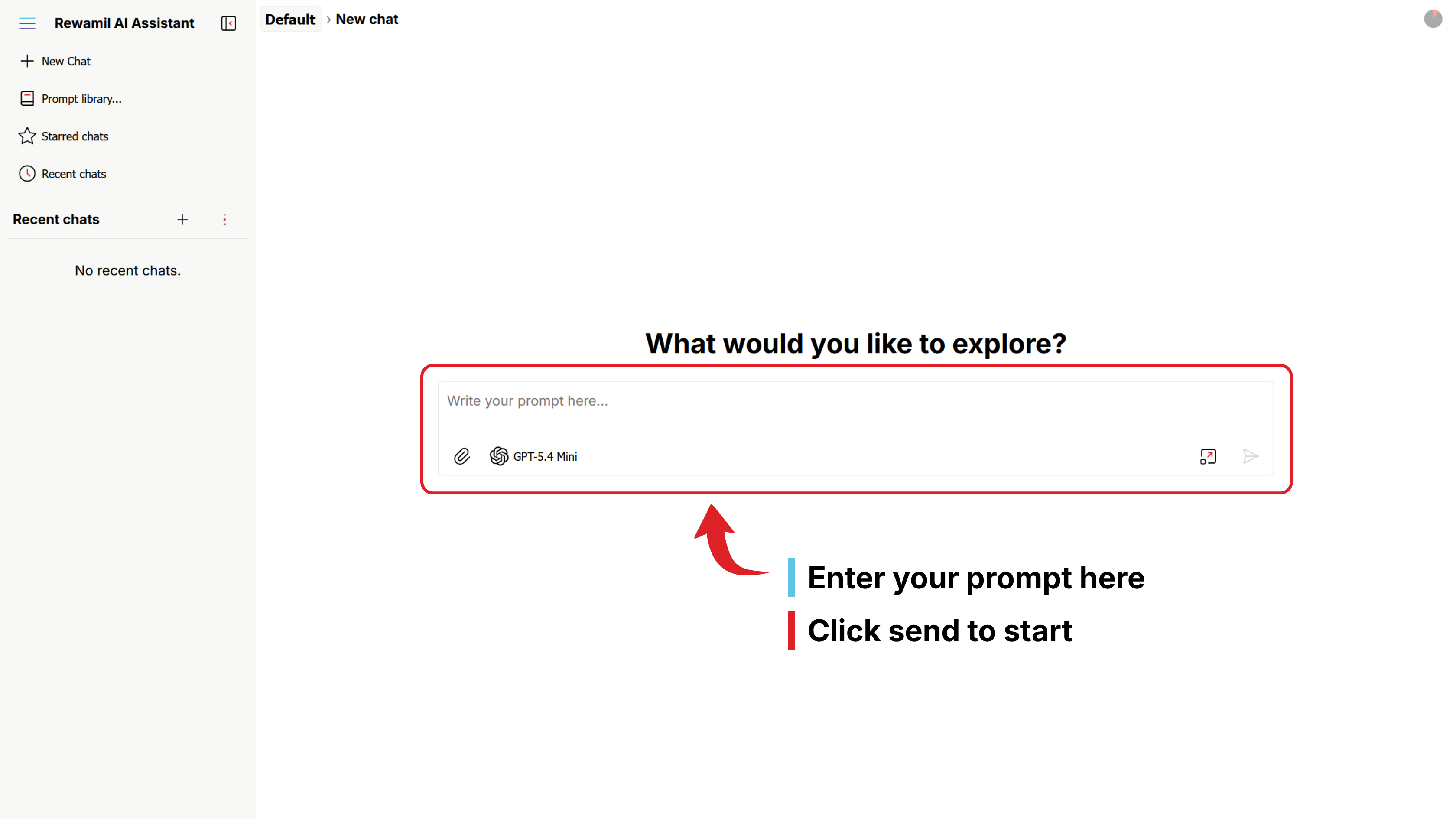
You land on a fresh chat screen — prompt box at the bottom, recent chats on the left. Click New Chat, or just start typing.
e.g. "Summarise the key risks in the attached audit report in five bullet points." Optionally attach a file.
Press Enter or click Send. The response streams in, with a live status above it — Working…, Searching…
Every new account starts with BDT 20 in AI usage credit, plus free platform access until that credit is used. Explore freely before subscribing. 24 hour credit validity
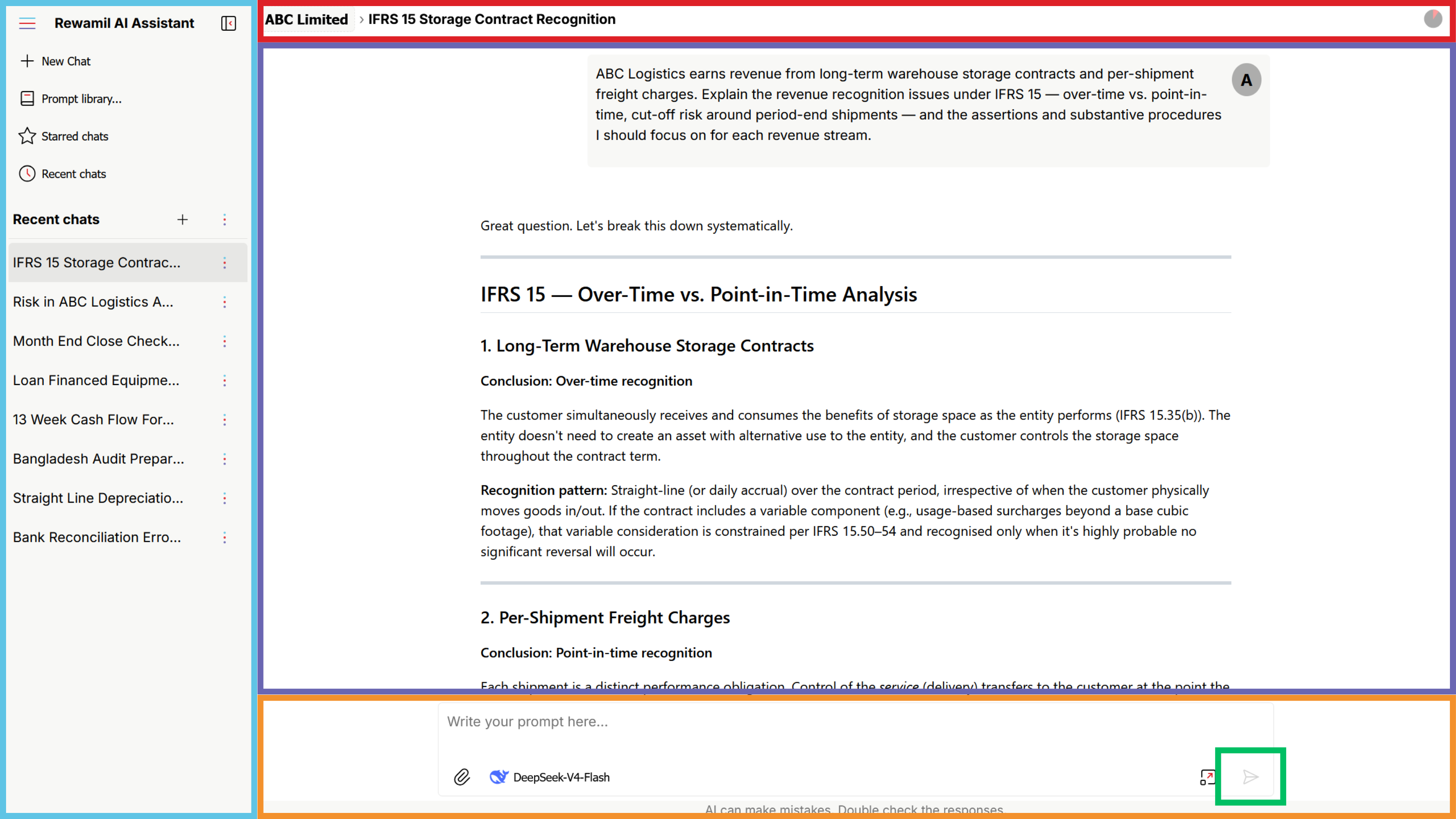
Each chat keeps the full history of your prompts, the AI's replies, and any files you attached along the way.
Folders organise chats. Beyond ones you create, Rewamil gives you three special, read-only views.
Your latest chats, regardless of which folder they live in.
Anything you've marked as favourite — always one click away.
Chats moved out of the way but kept. Restore any time.
Create as many folders as you want — by client, project, team, or topic. Move chats in and out freely.
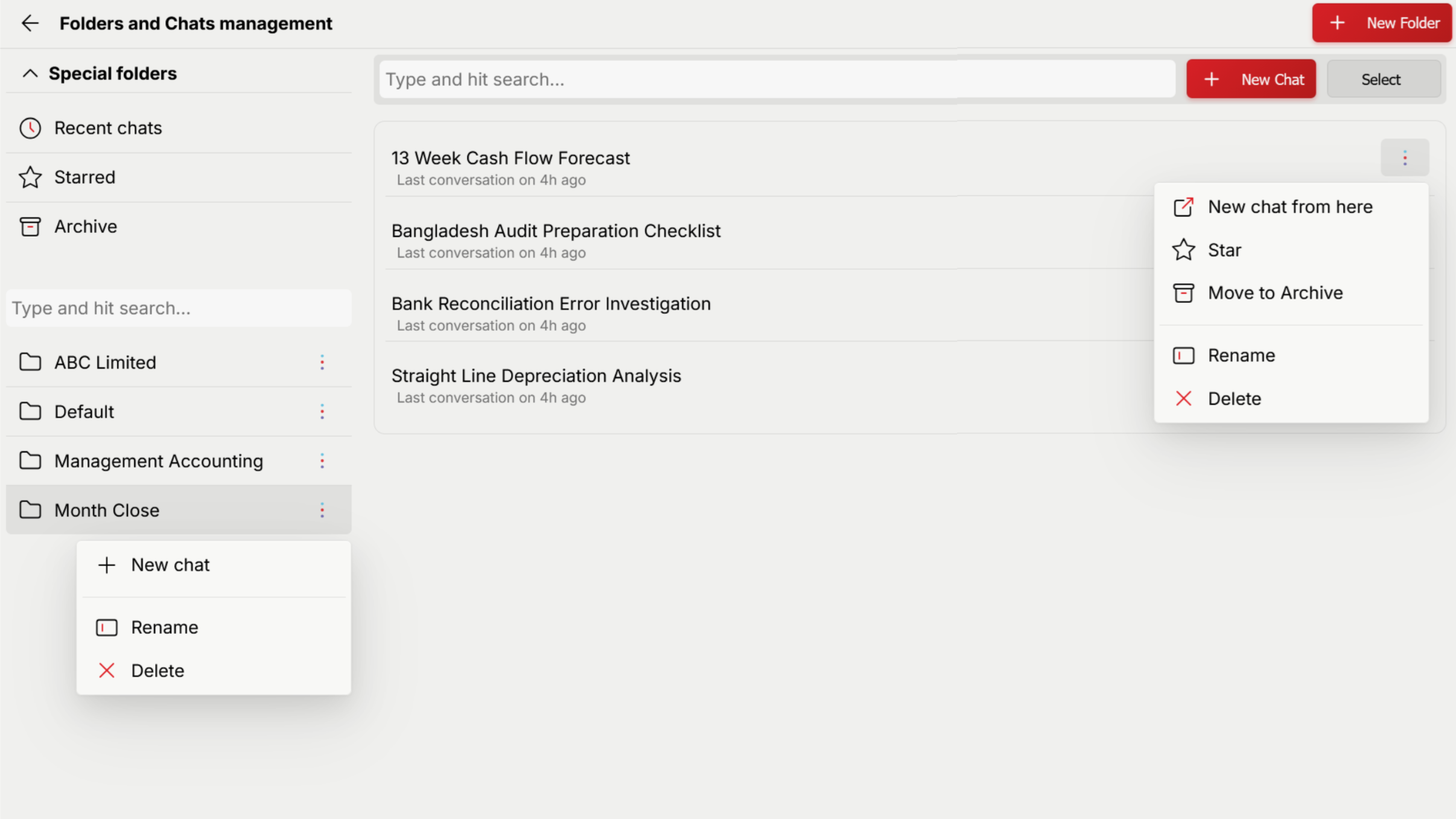
Rewamil supports multiple AI models — each with its own personality, speed and price. Three settings shape every response.
The AI you're talking to. Stronger models are more thorough but cost more per message.
On for step-by-step thinking — analysis, calculations, problem-solving. Off for quick writing.
How deeply the model thinks (or how creative if reasoning is off). High, Medium or Low.
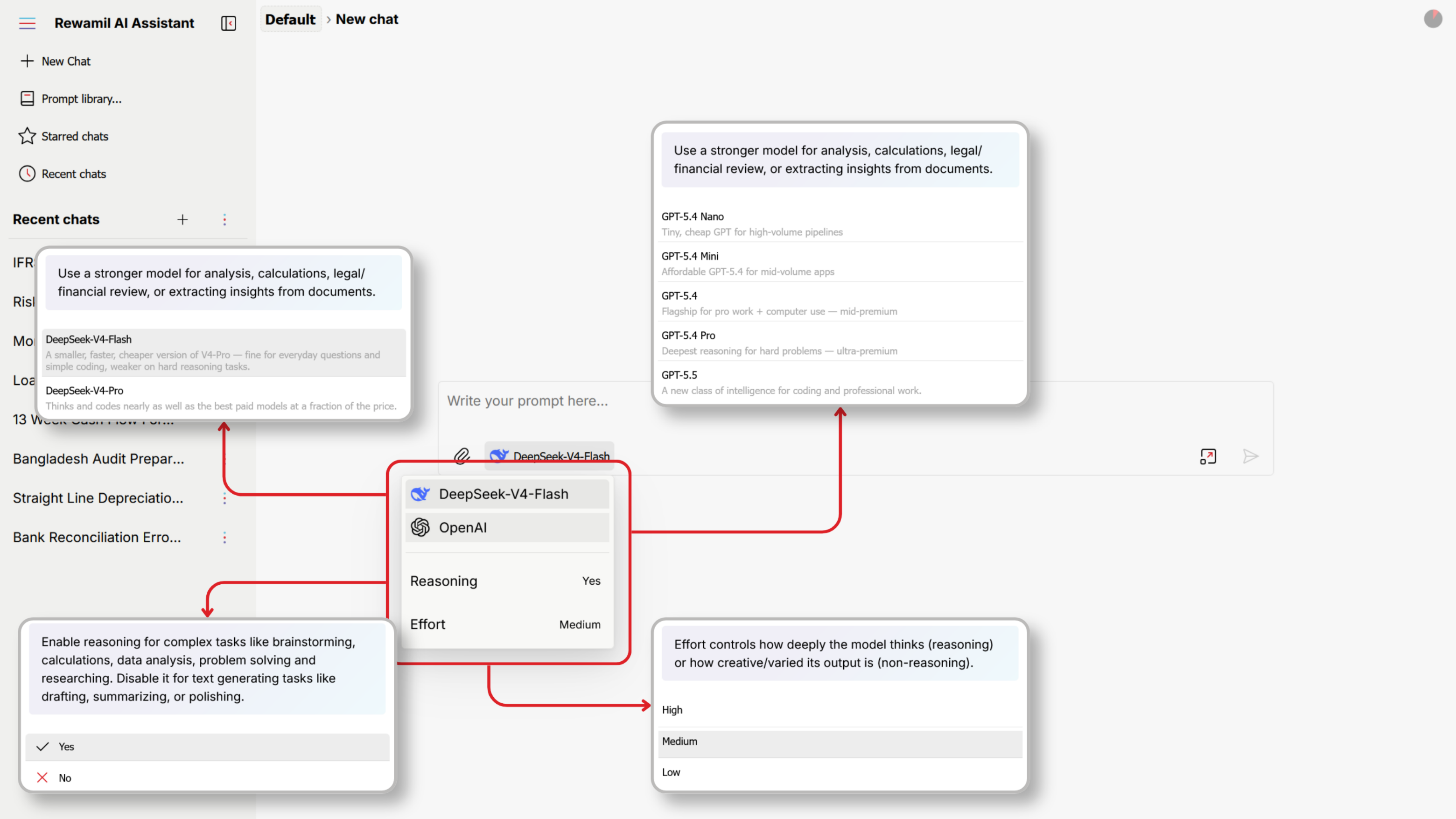
Each saved prompt is a fully-formed starting point — name, description, model, reasoning, effort, and a rich-text body of instructions.
Settings → Prompt Library → +. Name it, pick its default model / reasoning / effort, write the instructions (bold, italic, headings, lists, code blocks, block-quotes), and Save.
Start a new chat from the prompt via "Prompt library…" on the main screen. Set a favourite as your default to skip a step.
Click any prompt to edit. An indicator marks unsaved changes; Rewamil asks before you switch away. Delete via the × in the toolbar (cannot be recovered).
Drafting MoUs · Summarising board papers · Reviewing HR letters — saved once, launched in a click.
Rewamil follows industry-standard prompt practices. These are the moves that consistently work.
The first line should tell the model who it is, and what the end-state looks like.
CONTEXT · INSTRUCTIONS · OUTPUT FORMAT. Blank line between sections.
Tell the model what to do, then hand it the material to act on.
Length, tone, format. "Five bullets, no preamble" beats "make it concise".
Negative constraints save more time than positive ones, especially on long replies.
For nuanced tasks, one good example is worth a paragraph of instructions.
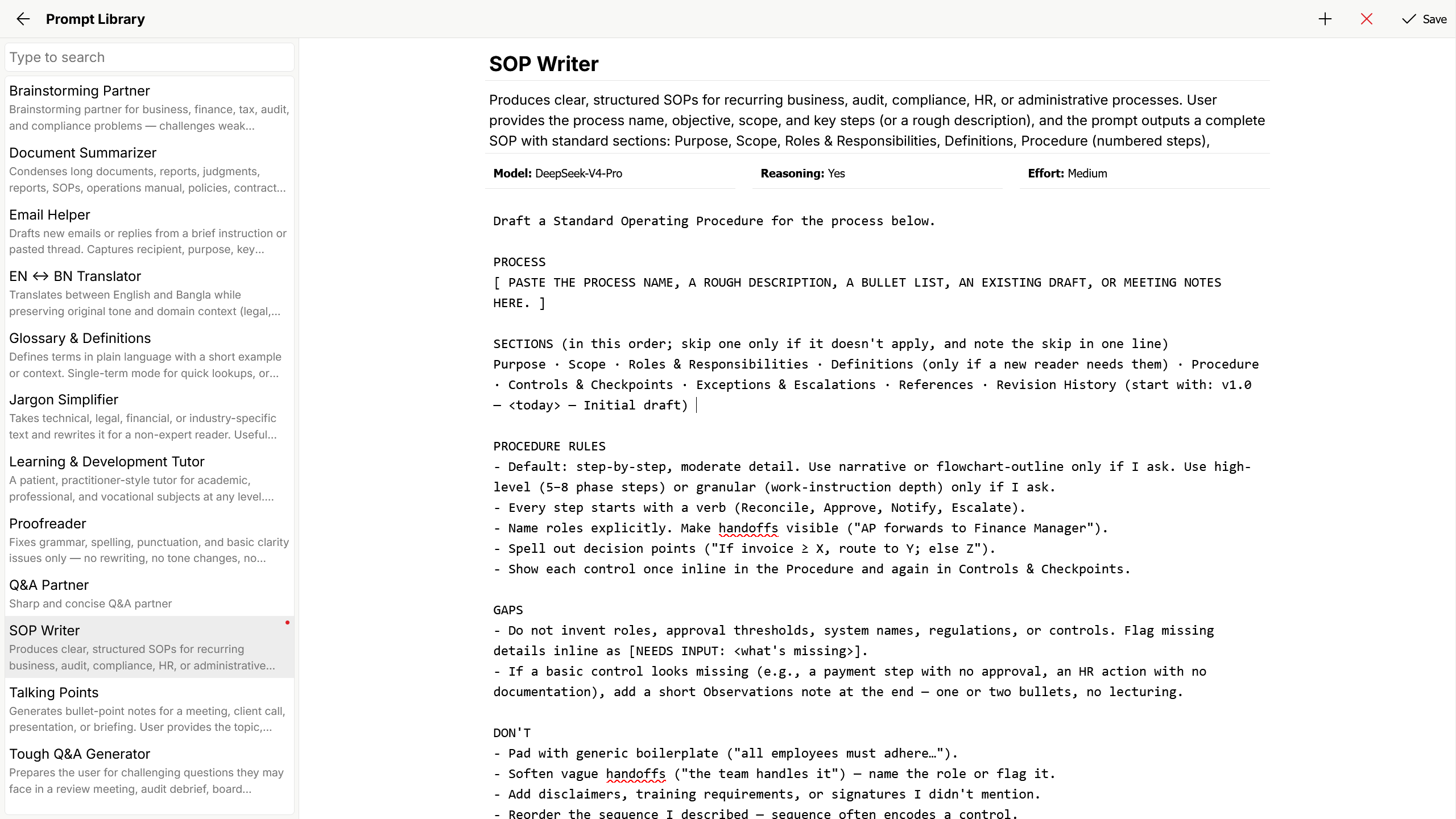
Up to 5 files per message. Files are parsed in your browser before upload, so large PDFs may take a few seconds.
Pick files. The attach button is briefly disabled while Rewamil reads them.
Click to preview, × to remove.
Rewamil sends the parsed text of each file, labelled by its original name.
Files attached earlier in a chat are remembered for the rest of that conversation — quote them, summarise them, compute over them at any point.
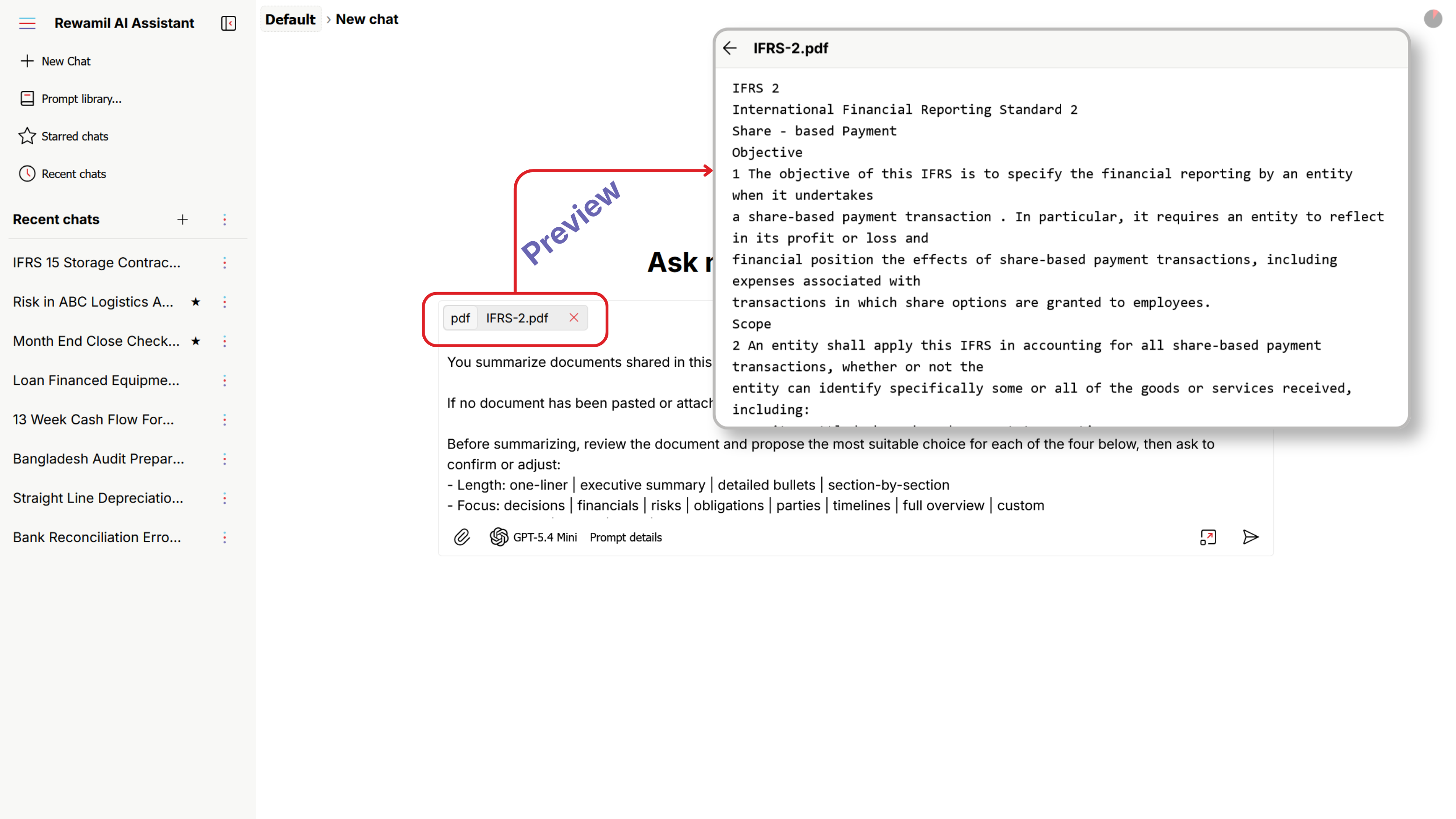
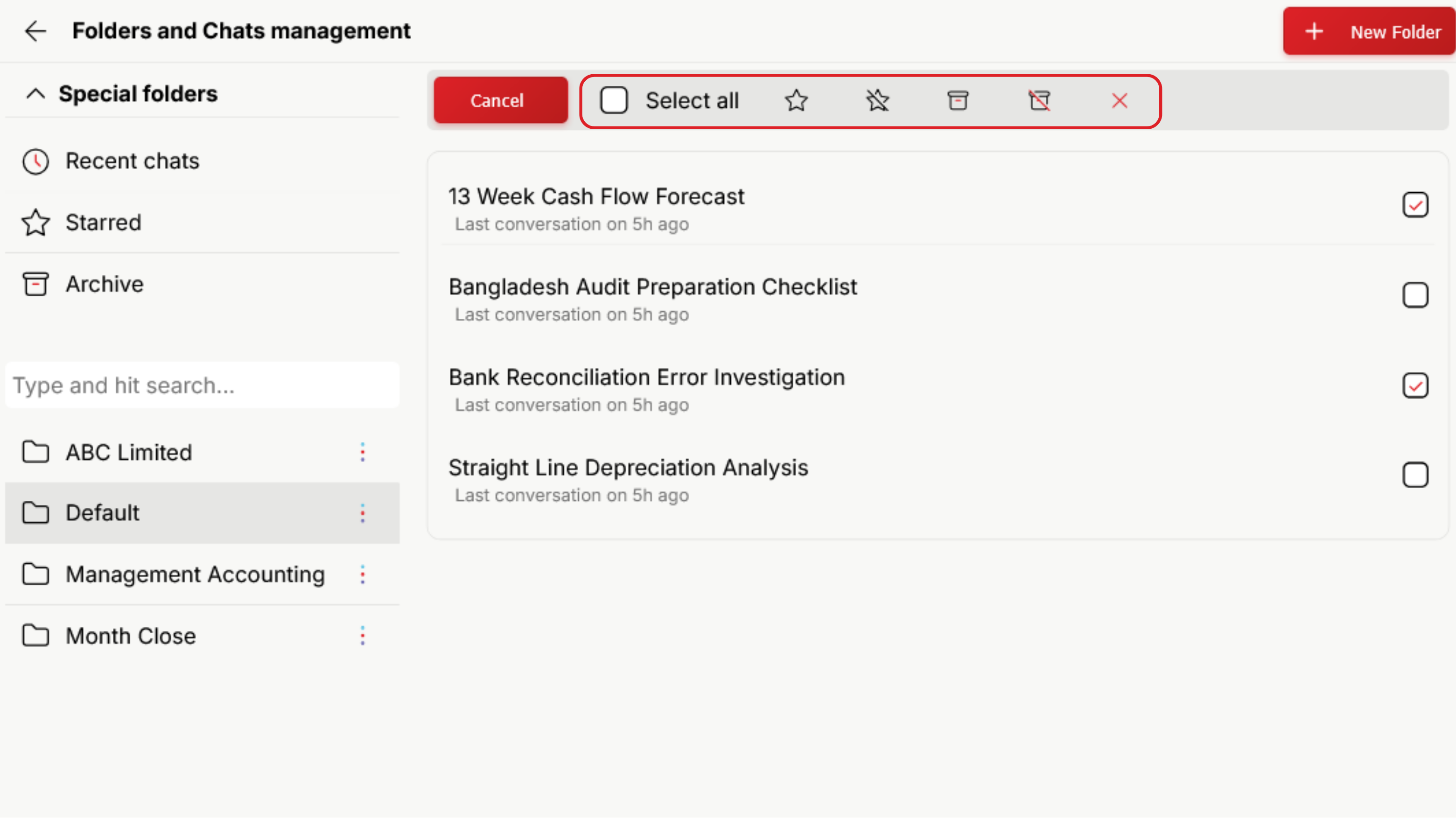
Open the Folder Manager from the sidebar chat-list menu ("Browse for folder…") or Settings → Folders.
Start a new chat that carries this one's context.
Mark or unmark as favourite.
Move out of the way or bring it back.
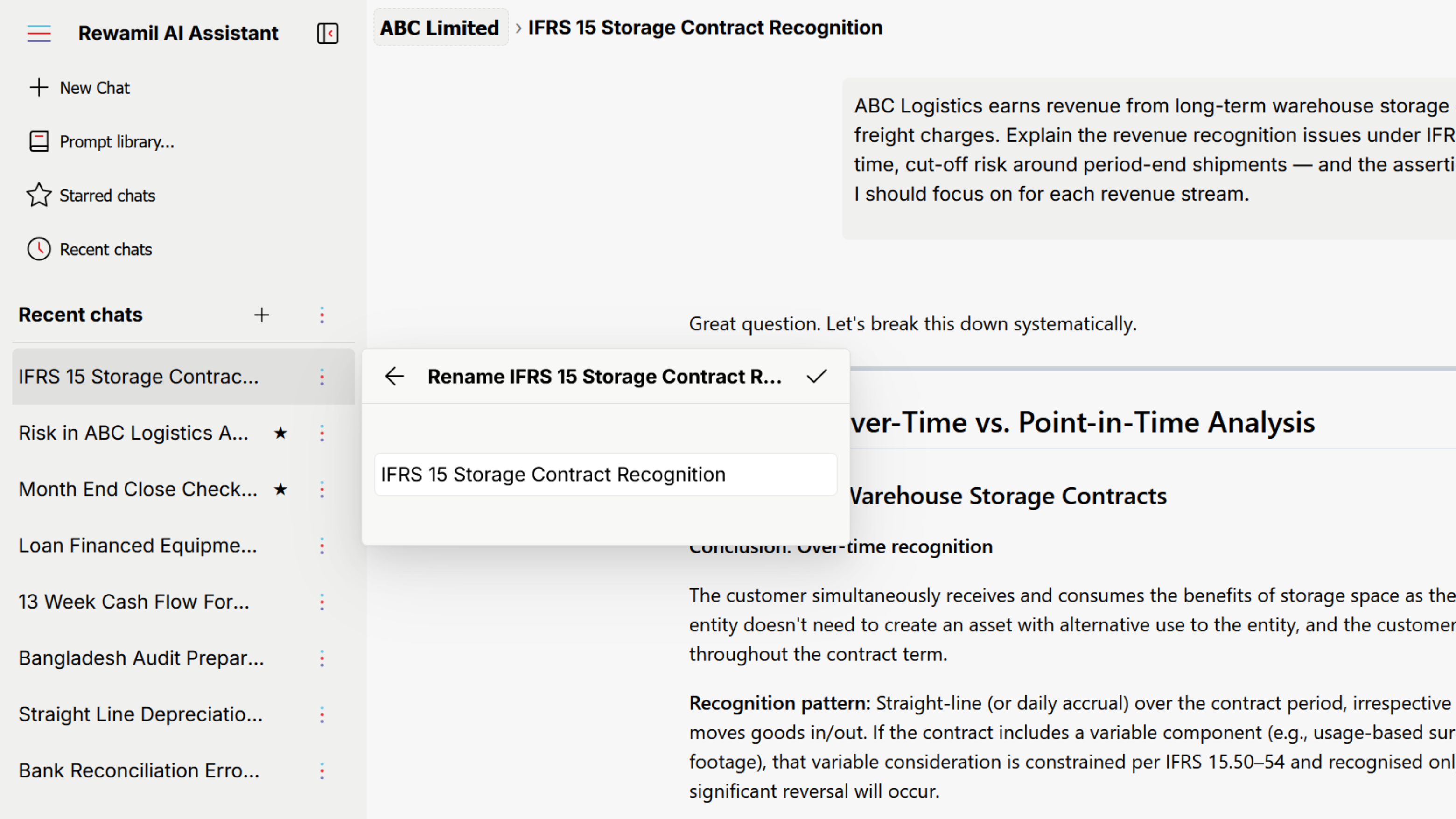
Override the auto-generated name.
Permanent. Rewamil asks for confirmation first.
Switch models mid-chat via the model button in the prompt toolbar. The change applies to your next message; earlier replies stay as answered.
| Reasoning | Best for |
|---|---|
| ON | Analysis, calculations, multi-step problems, brainstorming, research, code review, debugging. |
| OFF | Drafting, summarising, polishing, quick translations or rewrites, short factual answers. |
| Effort | Use for |
|---|---|
| High | Brainstorming, creative writing, varied ideas. More creative, possibly slower. |
| Medium | Drafting, summaries, everyday professional writing. Balanced. |
| Low | Analysis, calculations, factual extraction. Tighter, more deterministic. |
Reasoning ON + Effort High — when the AI must think hard. Board paper review. Financial analysis.
Reasoning OFF + Effort Low — when you need consistent factual output. Data extraction. Structured replies.
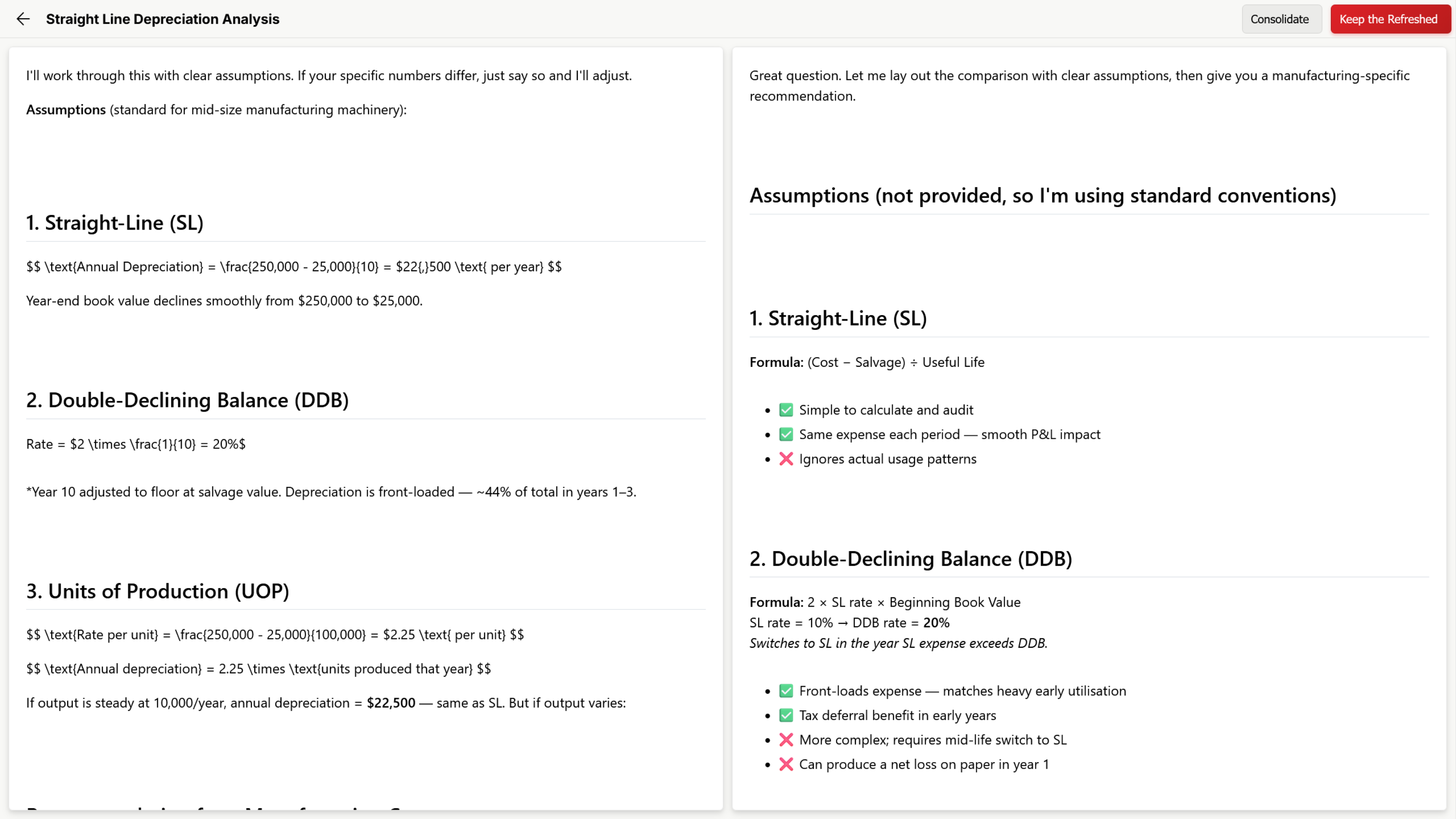
Hover the AI's response, click the Refresh icon. A side-by-side window opens — original on the left, refreshed on the right, both fully readable.
Replaces the original. Use when the new one is clearly better.
Rewamil merges the best of both into one reply. Use when each has something useful.
Discards the refresh, keeps the original. Use when the new one is worse.
Only the version you accept is saved. You can also delete a single AI response via the 🗑 icon in the hover toolbar (cannot be recovered).
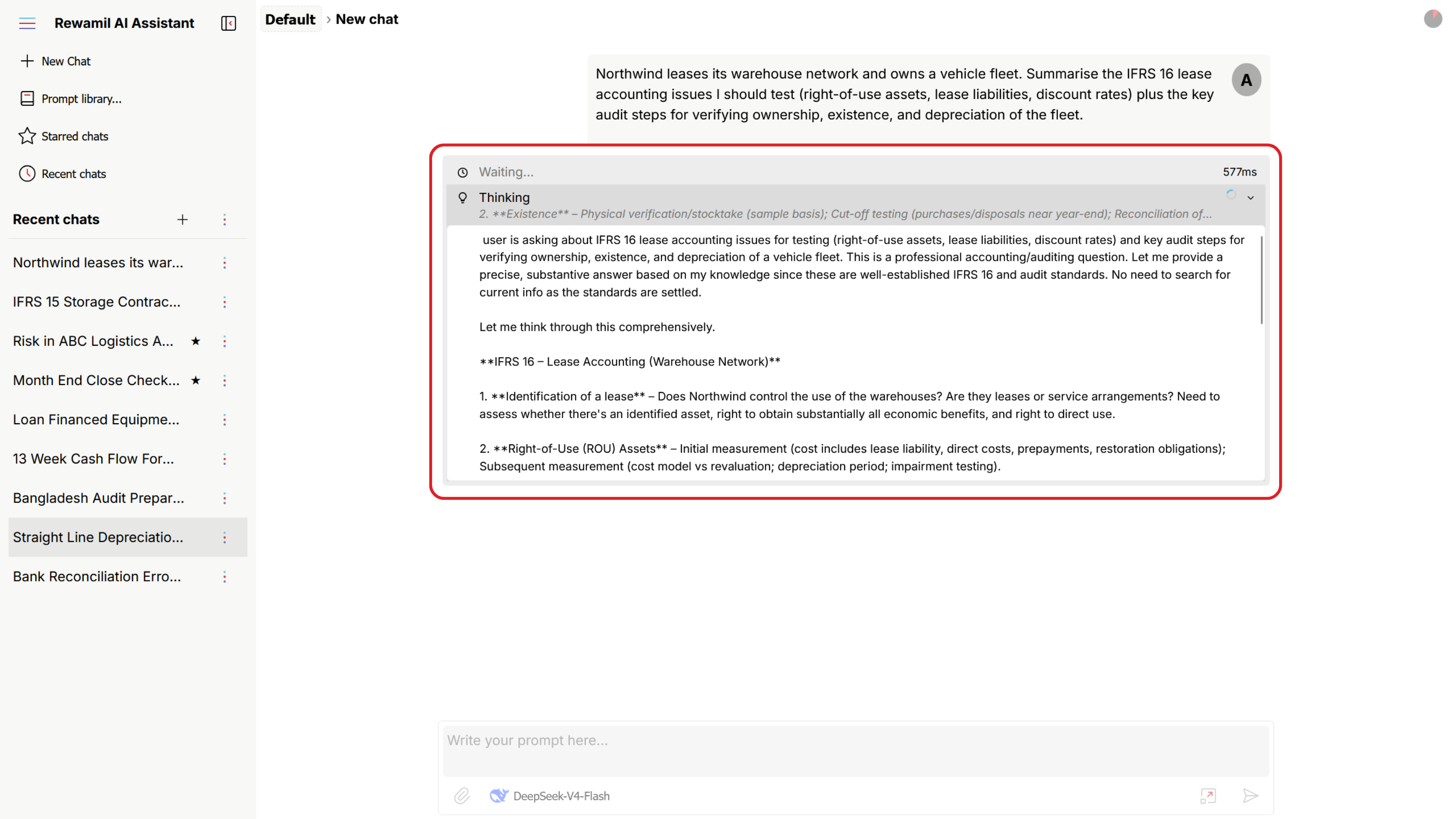
As the reply forms, Rewamil shows a live status line above the response.
Request received, preparing the model.
Working…Looking something up on the web.
Searching: "BSEC listing rules"Fetching a webpage to use in the answer.
Reading: example.comAnswer appearing word-by-word.
Streaming replyRewamil auto-scrolls to follow the response. Scroll up to read something and auto-scroll steps aside — until you return to the bottom.
If something goes wrong, Rewamil shows a clear message and returns your prompt to the input box. You never lose what you typed.
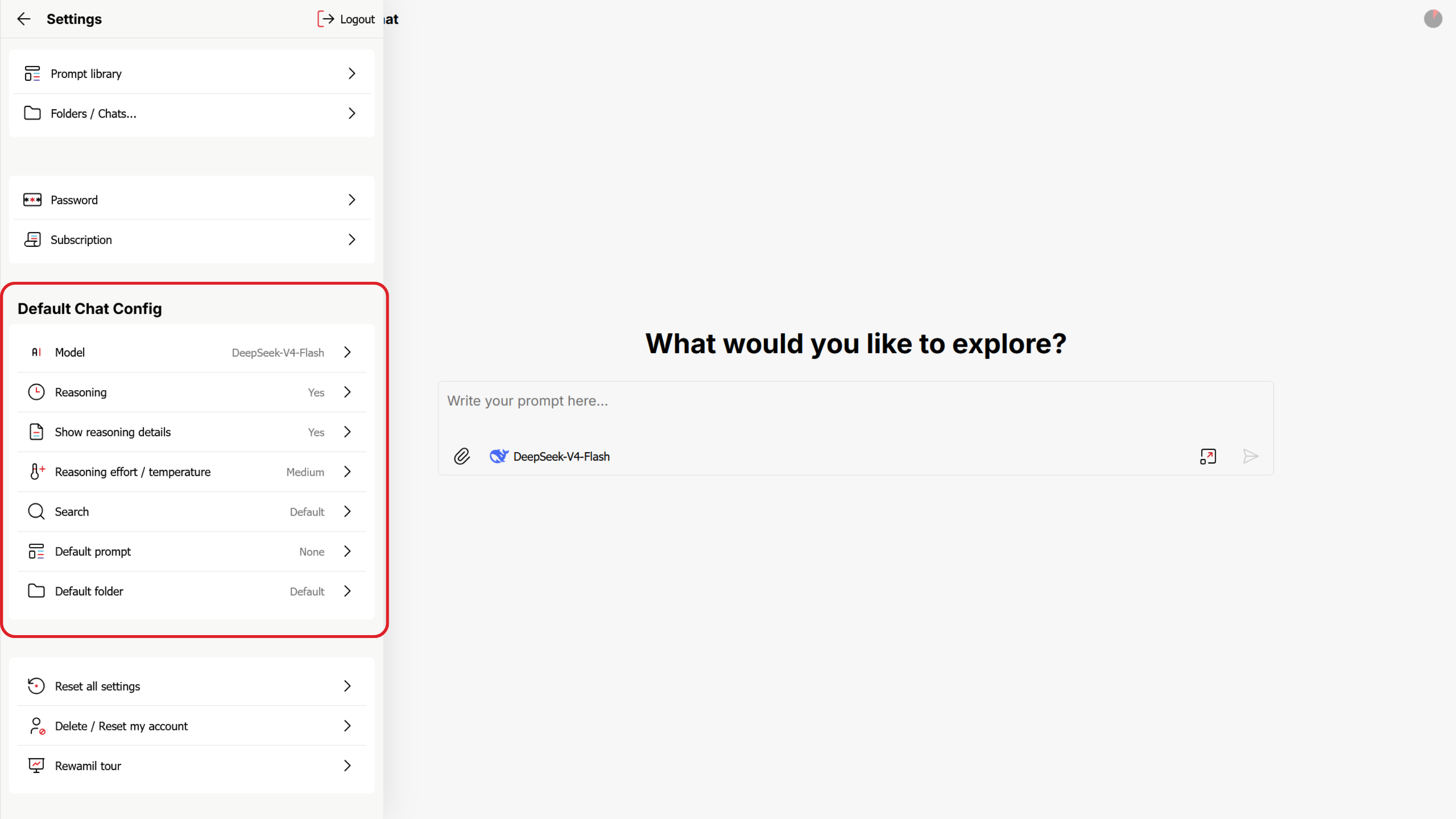
Open the main menu icon at the top of the sidebar.
Reset all settings restores defaults and clears stored API keys — cannot be undone. Delete / Reset my account removes your account and data. Use with care.
Rewamil uses a prepaid wallet. Charges are deducted automatically — no card needed.
New users get BDT 20 token credit and free platform access until it's used. Free access lapses after 3 days — use it within three days.
Automatic at the end of each 30-day cycle — as long as the wallet holds at least BDT 500. There is no "renew" button. Keep the balance topped up.
No refunds. No mid-cycle cancellations. To stop, simply stop topping up — the subscription lapses on its own.
Open Settings → Subscription → Wallet Top-up.
Bank transfer or bKash. Account details appear on screen.
Send funds from your banking or bKash app.
From your receipt — the transaction reference.
Enter the Amount and Reference. Add a note if you wish. Submit.
Our team reviews it, then posts it to your wallet. You can use Rewamil as soon as you top up.
If there's an issue with a top-up, your account may be put On Hold — you can't use Rewamil until support resolves it.
The minimum varies with your status. Not yet subscribed? The minimum covers the next 30 days plus the BDT 500 minimum. Below BDT 500? The minimum tops you back up. Rewamil shows the exact figure on the top-up screen.
You don't lose anything immediately. Rewamil gives you a clear window to recharge.
Your account enters read-only mode.
You can sign in, view chats and files, and recharge. You cannot send new messages until the balance covers the next subscription and usage.
Without a top-up, the account may be deleted.
You'll know well before zero — the wallet shows balance and next-renewal date on every visit to Settings.
Top-ups, subscription renewals, AI usage — all recorded. Pull a statement for any period up to 90 days at a time.
One screen for the full ledger.
Range must be ≤ 90 days. Leave To blank for today.
Rewamil generates a CSV with your name, email, the date range and every transaction.
For longer periods, download multiple statements back-to-back. Each CSV is self-contained and stacks in Excel without reformatting.
Bring a file. Try a prompt. Compare a refresh. You won't break anything — and your BDT 20 credit is on the house while you find your feet.
No card required. Top up by bank or bKash when you're ready.